A WBL training agreement is the document that names the student, employer, supervisor, and school, sets the schedule and learning objectives, and lists each party's responsibilities and safety requirements. It is signed before the student starts. Download the free template below (PDF or DOCX) and have your district review it.
Free, no sign-up. Review with your district before use.
What is a work-based learning training agreement?
A training agreement is the legal document that defines the WBL relationship for one student at one worksite. As our guide to standardize your WBL documents explains, it should name the student, employer, supervisor, learning objectives, hours, wages (if any), and the FLSA classification of the work.
It is easy to confuse with two related documents:
- Training plan: the list of tasks and competencies the student will work on. Many programs, including this template, put the plan inside the agreement.
- Employer MOU: broader than a training agreement. It covers your ongoing relationship with the employer, such as insurance verification, EEO compliance, and supervisor designation, rather than a single student's placement.
Names vary by state and program. Kentucky uses a combined "plan and agreement," and Ascend Indiana publishes a "training plan and partnership agreement." If a placement is part of a registered apprenticeship, the program may have its own required agreements; see pre-apprenticeship vs. registered apprenticeship.
What's included in this template
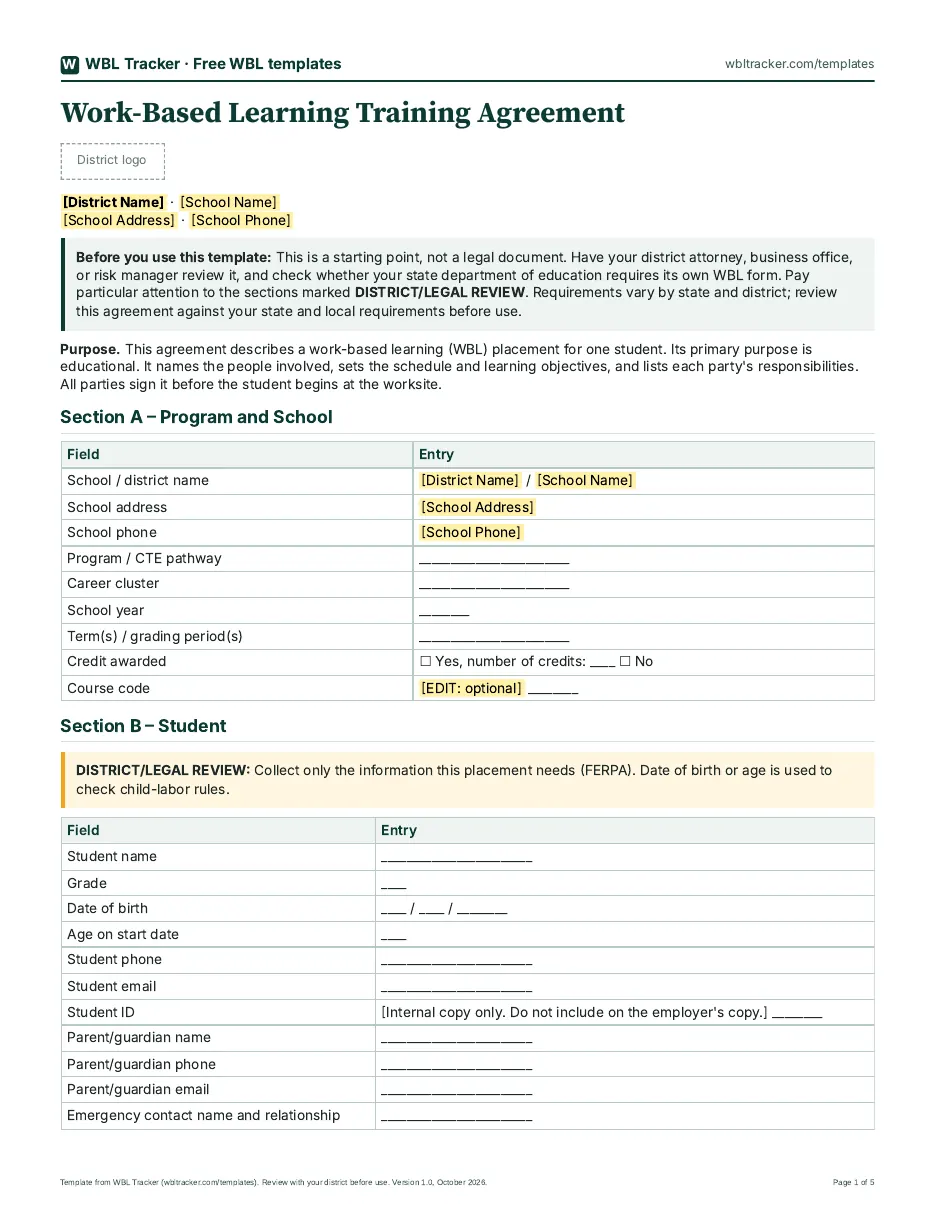
The template has twelve sections, A through L. Fill in the highlighted [EDIT] fields and delete anything your program doesn't use.
A. Program and school
School or district, program or CTE pathway, school year and term, and whether the placement earns credit. This ties the placement to the student's program of study, which matters later for reporting.
B. Student
Name, grade, age at start, contact details, parent/guardian, and emergency contact. Age is there because child-labor rules depend on it. Collect only what you need, and keep medical and insurance details on a separate confidential form.
C. Employer and worksite
Business name, worksite address, supervisor and backup contact, and industry. The backup contact matters on the day the supervisor is out.
D. Placement details
WBL type, job title and duties, dates, total hours required, a weekly schedule, paid or unpaid status, and transportation. This is the section employers and parents read most closely, so be specific.
E. Training plan and learning objectives
A table of five to eight objectives, each with the tasks, where and when they happen, the expected proficiency, and how it will be evaluated. An optional column aligns each objective to a graduation competency or standard, using the competency mapping template.
F. Safety
Safety orientation, required PPE and training, the employer's confirmation that tasks follow child-labor hazardous-occupation rules for students under 18, any required work permit, and the incident-reporting procedure.
G. Insurance and liability
Who provides workers' compensation coverage, whether the employer's liability certificate is on file, and whether supervisor background checks are required. Fill this in only with your district's guidance.
H. Responsibilities
Editable lists of what the student, parent/guardian, employer, and school each commit to. Shared expectations prevent most mid-placement problems.
I. Evaluation and monitoring plan
How often timesheets are due, the midpoint and final evaluation dates, and planned site visits. It links to the WBL timesheet template and the employer evaluation form.
J. Data sharing and consent
What student information the school will share with the employer and why, plus parent or eligible-student consent and optional media consent.
K. Changes, withdrawal, and termination
How schedule or duty changes are approved, how much notice is needed to end a placement, and who must be told.
L. Signatures and distribution
Signature lines for the student, parent/guardian, supervisor, coordinator, and an optional administrator, plus a checklist for who gets a copy.
How to fill it out, step by step
Step 1: Complete the placement details with the employer
Sit down (or get on a call) with the supervisor and fill in Sections C and D together: duties, schedule, start and end dates, total hours, and paid or unpaid status. Doing this together avoids surprises in week one.
Step 2: Write learning objectives with the supervisor, phrased as competencies
Task-only objectives describe what the student will do. Competency-based objectives describe what the work demonstrates. Our post on rewriting learning objectives as competencies gives this kind of example:
- Before: "Student will learn to operate the band saw safely and identify wood grain."
- After: "Through safe band saw operation and wood grain identification, student will demonstrate critical thinking (problem-solving in tool selection), communication (following written and verbal instruction), and academic preparation (material science concepts)."
Objectives written this way give the supervisor something specific to rate on the evaluation.
Step 3: Confirm safety, age and hour rules, and insurance before anyone signs
Check the student's age against federal and state child-labor rules, confirm the tasks are allowed for that age, confirm any work permit your state requires, and settle workers' compensation and liability coverage with your district. Don't leave Sections F and G for after the start date.
Step 4: Collect signatures
Get signatures from the student, parent or guardian (if the student is under 18), worksite supervisor, WBL coordinator, and an administrator if your district requires one. Our playbook's rule applies: confirm training agreements are signed before day one on site. A pre-placement meeting with the student, parent, supervisor, and coordinator is a good time to sign. Our guide to onboarding workplace supervisors covers what to tell the supervisor at that point.
Step 5: Distribute copies and file the original
Give copies to everyone on the distribution checklist and file the original. Retention rules vary by state. Tennessee's WBL packet, for example, says copies must be kept on file at the school for five years after placement. Use your own state and district rule.
Legal and compliance items to review with your district
District and legal review required. This section lists what to ask, not what the law requires in your state. Bring these questions to your district attorney, business office, or risk manager before the template is used.
- Child labor and hours (FLSA). What hours and times of day may 14- and 15-year-olds work, and what are your state's rules? Which tasks fall under hazardous-occupation restrictions for students under 18? See 29 CFR 570.35.
- Paid vs. unpaid status. If the employer is a for-profit business and the placement is unpaid, how does it hold up under the Department of Labor's "primary beneficiary" test? See DOL Fact Sheet #71.
- Work permits and age certificates. Does your state require one for this student and this placement?
- Workers' compensation. Who covers the student, the school or the employer? The answer can depend on your state and on whether the placement is paid.
- Liability insurance. Which certificates do you need on file from the employer?
- Transportation. Who is responsible when the student drives, rides with a parent, or is driven by the school or the employer?
- Background checks. Does district policy require them for worksite supervisors?
- Nondiscrimination and harassment. How does the student report a concern, and who responds?
- FERPA and student data. What student information may the school share with the employer, for what purpose, and with whose consent? See FERPA.
Common mistakes
- Unsigned on day one. The student starts before every signature is in. Confirm training agreements are signed before day one on site.
- Vague objectives. "Learn about the business" can't be evaluated. Write objectives the supervisor can observe and rate.
- No emergency contact. Fill in Section B every time, even for short placements.
- No evaluation schedule. If Section I doesn't set midpoint and final dates, the evaluation tends not to happen.
- An out-of-date state form. If your state publishes a required form, check that you're using the current version.
Related templates
- WBL timesheet template: log and verify hours each week.
- Employer evaluation form: midpoint and final ratings tied to the objectives in Section E.
- Competency mapping template: align placements to graduation competencies.
- All free WBL templates
Manage agreements and hours in one place
A signed agreement on paper is fine. Keeping track of dozens of them, plus the hours and evaluations that go with each one, is where work-based learning software helps. WBL Tracker gives you real-time visibility into all placements and hours, sends automated reminders, and, per our internship tracking page, gives employers a portal to post opportunities, review applications, and verify student hours. For internship-heavy programs, see our internship tracking software.
Frequently asked questions
What is a work-based learning training agreement?
It is the signed document that sets the roles, schedule, learning objectives, and safety requirements for one student's work-based learning placement. The student, employer, and school agree to it before the student starts.
Who signs a WBL training agreement?
Typically the student, a parent or guardian (for students under 18), the worksite supervisor, the WBL coordinator, and often a school administrator. Follow your district and state policy on who must sign.
Is a training agreement legally binding?
It depends on your district and how the document is written. Some published templates state that they are not contracts or not legally binding; Ascend Indiana's training plan and Job Corps' program agreement are two examples. Have your district attorney review the agreement before you use it.
What's the difference between a training agreement and a training plan?
The agreement covers roles and responsibilities: who does what, when, and under what conditions. The training plan lists the tasks and competencies the student will work on. This template includes both, with the training plan in Section E.
Do unpaid internships need a training agreement?
Most programs use one for any extended placement, paid or unpaid. Paid vs. unpaid status has its own legal implications; the U.S. Department of Labor's Fact Sheet #71 explains how internships at for-profit employers are evaluated. Review the arrangement with your district.
How long should we keep signed agreements?
Follow your state and district record-retention rules. As one example, Tennessee's WBL packet says copies must be kept on file at the school for five years after the placement. Your state's rule may be different.
Can I add my state's required fields?
Yes. The DOCX version is fully editable. Check your state department of education's form requirements and add any fields it requires.
See how WBL Tracker handles placements and hours
Get a walkthrough built around your program, your placements, and your reporting needs.